 1 / 7
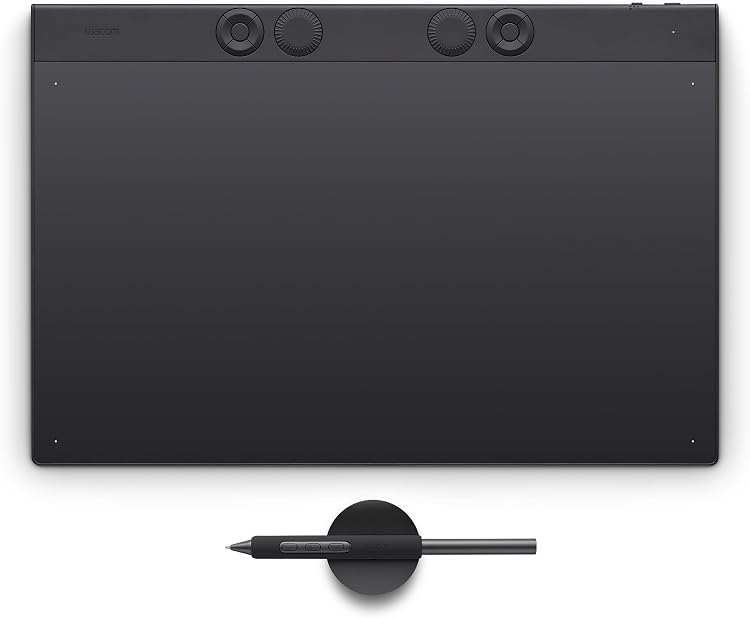
Wacom Intuos Pro L Large Pen Tablet with Pro Pen 3
The Wacom Intuos Pro L is a large pen tablet for creative work with a computer, supplied with the Wacom Pro Pen 3 according to the title. Its listed 13.7 x 7.7 in active area, shortcut controls and wired or Bluetooth connectivity suit detailed drawing and editing workflows. The product details also list a screen size, although a pen tablet is not a display, so check the selected listing’s specifications before buying.
At a glance
- Large active area is listed as 13.7 x 7.7 in, with a 16:9 format described by the manufacturer.
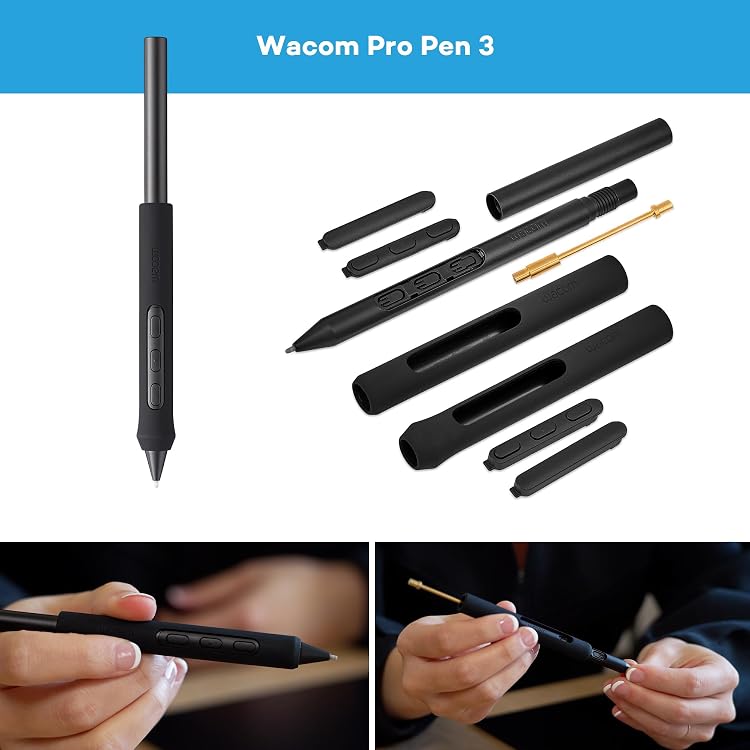
- Pro Pen 3 is described as having 8,192 pressure levels and tilt recognition, with adjustable grip, buttons and weight.
- ExpressKeys and a mechanical dial are designed for shortcuts and adjustments such as zoom or brush size.
- The manufacturer describes both wired USB and Bluetooth operation, with up to 16 hours of wireless use.
Often bought together
Pros and cons
Pros
- Large working surface is suited to detailed drawing, photo retouching and other desktop creative tasks.
- Configurable shortcut keys and a mechanical dial can reduce reliance on keyboard commands during supported workflows.
- Ambidextrous control layout accommodates left- and right-handed use.
- The included pen is described as adjustable, including its grip, button arrangement and weight.
Technical specifications
21 specifications| Brand | Wacom |
|---|---|
| Model | Wacom Intuos Pro L |
| Model number | PTK870K0B |
| Product type | Pen tablet |
| Pressure sensitivity | 8192 Levels |
|---|---|
| Native resolution | 8192 LPI |
| Active surface area | 13.7 x 7.7 in |
| Listed screen size | 21.12 |
| Pen | Wacom Pro Pen 3 |
| Pen features | customizable weights, buttons, and grips |
| Wireless connection listed | Bluetooth, USB |
|---|---|
| Bluetooth version | Bluetooth 5.3 |
| Controls | Ambidextrous Design, Ergonomic, Extra-Slim, Shortcut Key |
| Wireless battery life claimed | up to 16 hours |
| Operating systems listed | Windows, macOS |
|---|---|
| Compatible devices | Desktop, Laptop |
| Minimum operating system versions stated | Windows 10 or later and macOS 13 or later |
| Weight listed | 1.37 Kilograms |
|---|---|
| Dimensions | 37.7L x 25.3W centimetres |
| Colour | Black |
| Manufacturer warranty listed | 2 year manufacturer |
|---|
What to know before buying
Listing details to confirm
Listing details are inconsistent or unclear: the product is identified as a pen tablet, yet a screen size of 21.12 is listed without a unit, while the described active surface is 13.7 x 7.7 in. The title names the Pro Pen 3, the explicit box list names a digital pen, and the feature box list specifies Pro Pen 3 with accessories. Confirm the selected configuration and included pen before purchase. The listing also describes USB, USB-C and USB-C to A cable connections in different places, so verify the relevant port and cable details.
What’s in the box
- Digital penIncluded
- Pen holderIncluded
- Quick Start GuideIncluded
- Replacement nibIncluded
- USB cableIncluded
- Pen standCheck selected pack
- Pen accessoriesCheck selected pack
Check which accessories are included in your selected pack before buying.
Who is it for?
A good fit for
- Digital artists and illustrators seeking a large pen surface for use with a desktop or laptop.
- Photo editors, video editors and 3D artists who can make use of configurable application shortcuts.
- Left- or right-handed creators who want a tablet layout described as ambidextrous.
Less suited to
- Anyone seeking a standalone drawing display, since this is presented as a pen tablet requiring a computer.
- Buyers who need a confirmed package configuration or port and cable details without checking the selected listing.
Customer reviews on Amazon
- 5 stars
65% 65% - 4 stars
13% 13% - 3 stars
9% 9% - 2 stars
4% 4% - 1 star
9% 9%
Customer feedback describes the tablet as easy to install and use, with positive comments on quality. Reports about reliability and value are mixed, including both accounts of trouble-free operation and concerns about device issues or price. For buyers choosing a large tablet with configurable controls, ease of use matters, but the mixed reliability feedback is worth weighing. Aggregate ratings are broadly favourable but include a notable spread of lower ratings, and do not explain their causes.
Positive themes
- Customers describe it as easy to install and use.
- Customer feedback includes positive comments about product quality.
Mixed feedback
- Customer feedback is mixed on reliability, with some reporting flawless operation and others reporting issues.
- Opinions on value are mixed, with some considering it worth the money and others considering it overpriced.
Frequently asked questions
Does the Wacom Intuos Pro L have a built-in screen?
The listing identifies it as a pen tablet and mentions that a computer is necessary. Although a screen size of 21.12 appears in the details, no unit is given and the listing does not establish that the tablet has a display. Check the product configuration if a screen is essential.
What computer systems does it support?
The listing names Windows and macOS. Its manufacturer copy specifies Windows 10 or later and macOS 13 or later.
Is the Pro Pen 3 included?
The title names the Wacom Pro Pen 3, while the explicit contents list calls the item a digital pen and another listing section describes a Pro Pen 3 kit. Confirm the contents of the selected listing before ordering.
Can it be used wirelessly?
The manufacturer describes Bluetooth connectivity and claims up to 16 hours of wireless use. Battery life is a listing claim, not a guarantee for every workflow.