 1 / 5
StarTech 2-Port 10Gbps USB-A and USB-C PCIe Card
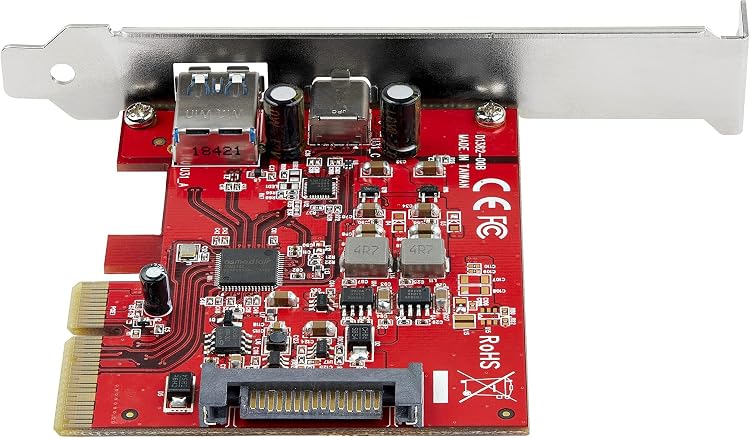
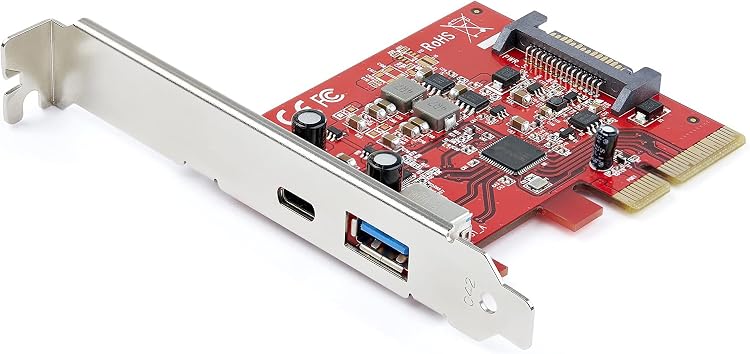
StarTech’s 2-port 10Gbps USB-A and USB-C PCIe card adds one port of each type to a compatible desktop or server. Its listed 10Gbps-per-port capability, UASP support and SATA supplemental power make it relevant for external storage, subject to the slot and power requirements.
At a glance
- Provides one USB-A and one USB-C port, with up to 10Gbps listed for each.
- Supports UASP for compatible external storage devices including SSDs, HDDs and NVMe drives.
- SATA power supplies supplemental power when motherboard power is insufficient.
- Listed for full- or low-profile PCIe 3.0 x4 desktop or server slots.
Pros and cons
Pros
- Separate USB-A and USB-C ports accommodate devices with either connector.
- UASP support is relevant to compatible external storage.
- The card can provide supplemental port power through a SATA connection.
Cons
- PCIe 2.0 operation is listed as lower performance than PCIe 3.0 x4.
- The USB-C port's stated power is up to 15W, while the USB-A port is listed at up to 4.5W.
Technical specifications
13 specifications| Brand | StarTech |
|---|
| Ports | 1x USB-A & 1x USB-C |
|---|---|
| Maximum bandwidth | 10Gbps per port |
| Supported USB versions | USB 3.2/3.1/3.0/2.0 |
| Storage protocol support | USB Attached SCSI Protocol (UASP) |
| USB-C power | up to 5V 3A/15W via the USB-C port |
|---|---|
| USB-A power | 5V 0.9A/4.5W via the USB-A port |
| Supplemental power connection | SATA power |
| PCIe slot | full or low-profile PCIe 3.0 x4 desktop/server slot |
|---|---|
| PCIe 2.0 note | lower performance w/PCI-e 2.0 |
| Operating systems and driver installation | Windows/Linux/macOS auto driver install (Windows 8 & up) |
| Dimensions listed | 11.9L x 8.1W x 1.8H centimetres |
|---|---|
| Weight listed | 0.11 Pounds |
What to know before buying
- The stated 10Gbps-per-port figure is a listing claim. PCIe 2.0 is explicitly described as lower performance, and supplemental SATA power is for cases where motherboard power is insufficient. Confirm your slot, case profile and power connection before purchase.
Who is it for?
A good fit for
- Desktop or server users adding one USB-A and one USB-C port through a PCIe slot.
- Users connecting compatible external SSDs, HDDs or NVMe storage who want UASP support.
Less suited to
- Users without a compatible PCIe slot or who need the listed PCIe 3.0 x4 performance from a PCIe 2.0 slot.
- Buyers who need more USB ports or higher stated USB-A power than this card provides.
Customer reviews on Amazon
- 5 stars
69% 69% - 4 stars
12% 12% - 3 stars
5% 5% - 2 stars
4% 4% - 1 star
10% 10%
Aggregate ratings lean positive, with many five-star ratings, but a notable share are one-star. Without customer-comment evidence, the reasons for either response are unknown. Treat the ratings as a broad signal rather than confirmation of real-world performance, and assess the listed slot, port and power limits against your setup.
Frequently asked questions
How many ports does this card provide?
The listing describes one USB-A port and one USB-C port.
What slot does it require?
The listing specifies a full- or low-profile PCIe 3.0 x4 desktop or server slot. It notes lower performance with PCIe 2.0.
Does it support external storage?
The listing claims UASP support for external SSDs, HDDs and NVMe drives.
Does the card need SATA power?
It has a SATA power connection for supplemental power when motherboard power is insufficient.